Walking is often overlooked as exercise precisely because it is so accessible, but it remains one of the most effective ways to protect your long-term health. Adding even 15 to 30 minutes of brisk walking to your daily routine can lower blood pressure, improve insulin sensitivity, boost your mood and mental clarity, and significantly reduce the risk of cardiovascular disease.
Building a lasting walking habit comes down to feedback. This is where walking apps come in. These apps are designed to show your progress – through step counts, pace or map routes – and turn a routine into a goal you actually want to hit. They will keep you accountable and make tracking your progress an effortless process.
To make your job easier, we’ve put together a list of five different walking apps, each with its own set of characteristics and tailored for various purposes. So keep reading to discover which one is optimal for your routine and specific needs.
ActivityTracker
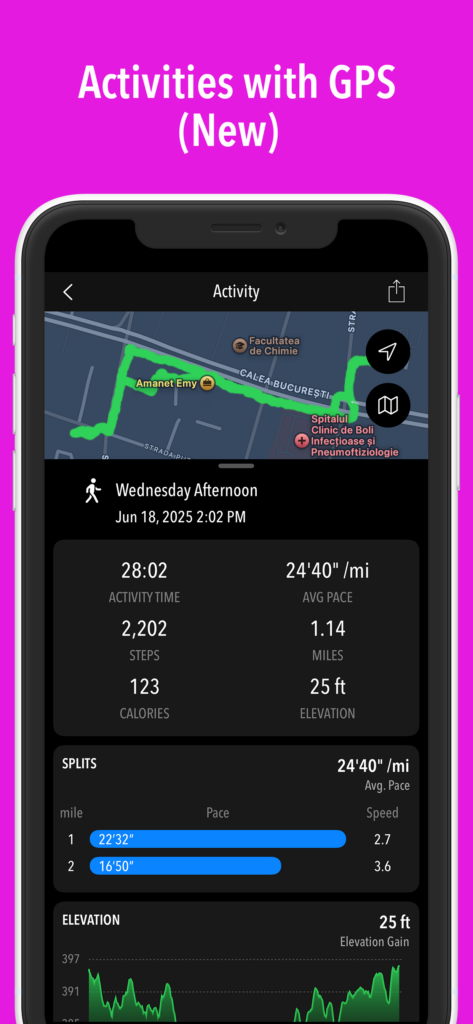
ActivityTracker takes the top spot for several reasons. It’s easy to use, elegantly designed, privacy-focused, packed with fitness stats and offers excellent flexibility when it comes to recording your walks.
The app leverages your phone’s built-in motion processor for battery-friendly tracking. It works continuously in the background, logging steps, active time, distance and calories burned automatically. For times when you specifically want a dedicated workout log with map overlays, its Activities mode lets you record GPS-based outdoor walks, hikes, runs or bike rides. In this mode you’ll get additional stats, including splits and elevation.
ActivityTracker comes with a modern UI and displays a clean visual breakdown of all the major fitness metrics. You can set custom weekly goals (which tend to be much more forgiving than strict daily streaks) and view your progress across day, week, and month charts. There’s also an Hourly view, which lets you see exact movement spikes throughout the day. The app provides progress notifications and inspirational quotes to keep you motivated and lets you share your results and walking route with friends and followers.
- Download: App Store, Google Play
Map My Walk
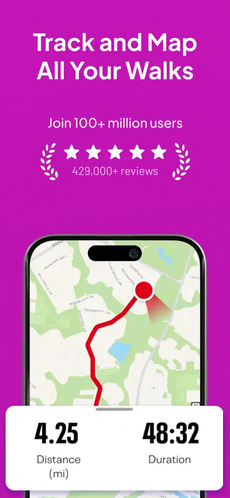
Map My Walk should be your go-to solution if your priorities are route planning, detailed workout logging and performance analysis. Do you find yourself walking the same three blocks repeatedly? The app’s route discovery feature comes to the rescue. This will allow you to explore popular paths and neighborhood trails anywhere in the world and help cure walking boredom.
Map My Walk relies on GPS to record your movement. You press “Start”, and it begins recording your path using location data. The app can send periodic voice updates through your headphones at configured distance or time split intervals, so you can keep your eyes on the path. The main dashboard centers on real-time routing. Key stats include distance, duration, pace, elevation and estimated calories burned. Post-walk, you get interactive route maps, split times per mile/kilometer, and elevation profiles.
- Download: App Store, Google Play
Walkmeter
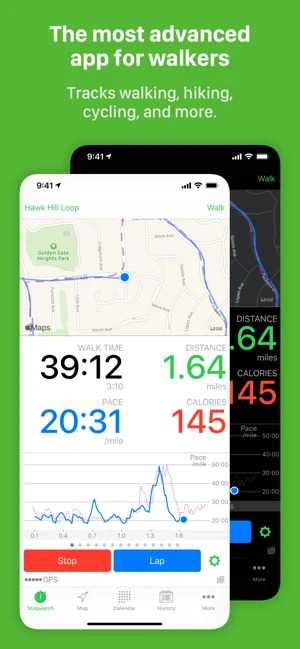
Walkmeter is built for walkers who love granular data, custom statistics and complete control over privacy. To track your physical activity, the app uses GPS along with support for external Bluetooth sensors (such as chest-strap heart rate monitors or cadence sensors). Crucially, all your data stays strictly on your device or personal cloud storage unless you choose to share it – no accounts or logins required.
When it comes to fitness data, you’re in for a treat because Walkmeter logs more than 250 statistics. Beyond standard distance and time, you get splits, intervals, trailing averages, heart rate zones, elevation gain/loss and cadence. Audio announcements are totally configurable – you can program Siri to read specific metrics aloud on demand or at fixed intervals. A distinctive feature is the unmatched customization. You can design custom workout display pages, program interval training structures (like walk/run intervals) and dive deep into post-walk bar charts and graphs.
While powerful, Walkmeter’s advanced stats can feel like overkill for everyday walking. If you’re looking for simple tracking, the depth of features may be overwhelming.
- Download: App Store, Google Play
Google Health
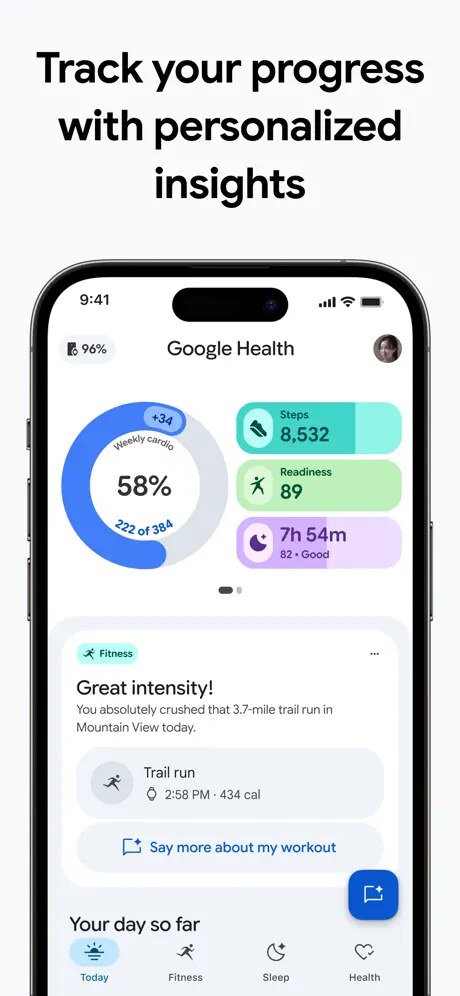
Google Health is designed more as an all-round health and activity hub. It’s not a dedicated walking app, but this doesn’t mean it can’t handle everyday walking quite well. The app can automatically record steps using the phone’s low-power sensors, while walking workouts can be started manually when you want to track a specific session.
Google Health focuses on core health indicators. These include your daily step count, estimated distance or calories burned. A recorded workout will provide additional information such as duration and pace. This can be a good fit for people who want walking to be part of a broader health picture rather than those looking primarily for a specialized walking experience. The app requires a minimal setup, integrates smoothly with other health platforms and various wearables and displays your daily totals in a clear and simple manner.
- Download: App Store, Google Play
Walk the Distance
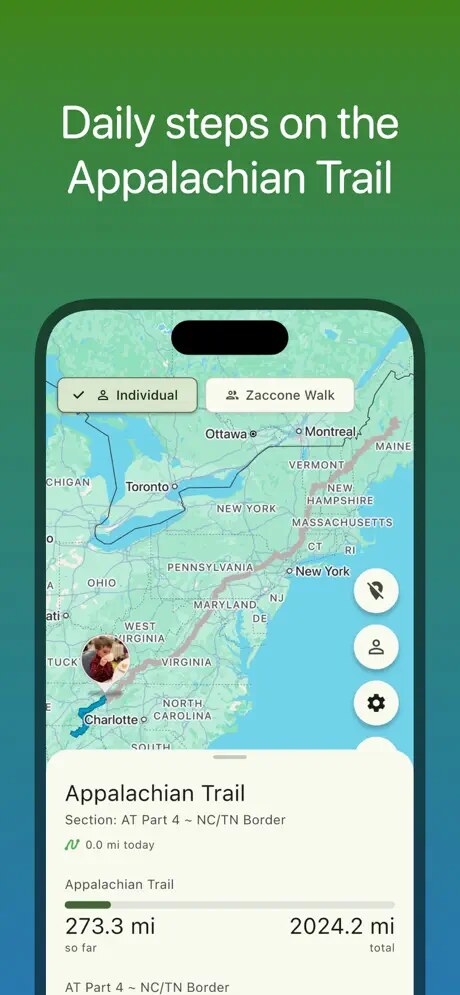
Walk the Distance takes a very different approach: instead of showing how many steps you’ve taken, it turns those steps into progress along real-world trails such as the Appalachian Trail, Boston Marathon and Camino de Santiago. The app reads step data directly from Apple Health on iOS or Google Health / Health Connect on Android, skipping the need for continuous background GPS. This makes it a truly battery-friendly alternative.
In terms of data, Walk the Distance focuses on displaying your progress and distance covered along the virtual trail. There are also checkpoints, maps, leaderboards and group challenges, which add a game-like element and motivate you to stay active. This app is particularly suited to people who already get their steps through everyday activities and want an extra sense of motivation or achievement, rather than runners or walkers looking for detailed GPS-based workout statistics.
- Download: App Store, Google Play

Hi, I’m Amrita Pandey. I specialize in writing about health, pregnancy, yoga, natural remedies, beverages, fruits, and vegetables. I enjoy creating clear, well-researched content that helps readers make informed decisions and build healthier everyday habits.